Ask a store manager who on the floor is trained to drive the forklift, run the tills or act as first aider, and you’ll usually get an answer from memory. Ask what a new cashier needs to learn before they can become a team leader, and the answer is a spreadsheet, a policy document and a conversation with HR.
A training matrix answers both questions on one page. A visual one is the version people actually look at.
What a training matrix is
At its simplest, it’s a grid. Down one side are the roles in the business. Across the top are the courses, certificates and licences. Each cell says whether that role needs that course.
That one grid answers the questions managers, HR and auditors keep asking. What does this job need? Who needs this licence renewed every two years? What separates a sales consultant from a team leader? Is the training we pay for reaching the people who need it?
Most organisations already hold this information. It sits in a learning system, an HR system and a few spreadsheets someone maintains by hand. The trouble is that a table of hundreds of rows doesn’t show a pattern, so nobody reads it. The knowledge is there, just below the surface, and nobody can use it.
What we made for a retailer
The brief started from a simple idea.
A job is a collection of tasks. A career has direction.
The training catalogue we designed for a national retailer in 2023 wasn’t a list of courses. It showed every employee where they were and where they could go, in three parts.
- The journey. Every course in the business laid out as one illustrated map, grouped into tracks: induction for everyone, in-store, statutory safety, supply chain, the contact centre, buying, and leadership development. Each stop says how long it takes and who it’s for.
- The matrix. Every role, department by department, against every course, drawn like a transit line. Each role’s line runs from its first required course to its last, with a stop for each one it needs. Read across and you see a job. Read down and you see who needs a course.
- The people. Employees who had moved up through the programme, telling the story in their own words.
Here’s the idea behind the matrix, with made-up roles and courses:
An illustration, not the real matrix
The lines do the work a table can’t. Leadership roles visibly reach further. The warehouse line jumps to a machinery licence the shop floor never needs. Anyone can find their own row and see the gap between it and the row above.
What print couldn’t do
The catalogue did its job, and people used it. But a printed matrix has limits that no amount of design fixes.
- It dates. A new course, a renamed role or a changed requirement means a new edition. Until then, the page is quietly wrong.
- It can’t answer your question. “I’m a cashier and I want to be a team leader. What do I need?” means finding two rows among dozens and comparing them stop by stop.
- It shows everything to everyone. A page that holds the whole business is impressive, but most people only want their own path.
What could be: a living map
So we’ve started building an interactive version of our own, one any organisation can load its roles and courses into. Nothing in it is new information: the roles, courses and requirements are the same kind of data a catalogue like this is drawn from. What changes is what people can do with it. It keeps what worked, the journey and the transit-line matrix, and adds what print can’t.
- Pick a role and the map lights up its path. Everything else steps back.
- Pick a course and see every role that needs it. That’s useful for planning sessions, budgets and renewals.
- Ask “where can I go from here?” Choose where you are and where you want to be, and it lays out the training between the two, in order, with the time it takes.
- Change it in place. HR can add a course or update a role’s requirements without waiting for a new print run.
- Feed it from your data. Roles, courses and requirements come from the systems that already hold them, so the map stays as current as they are.
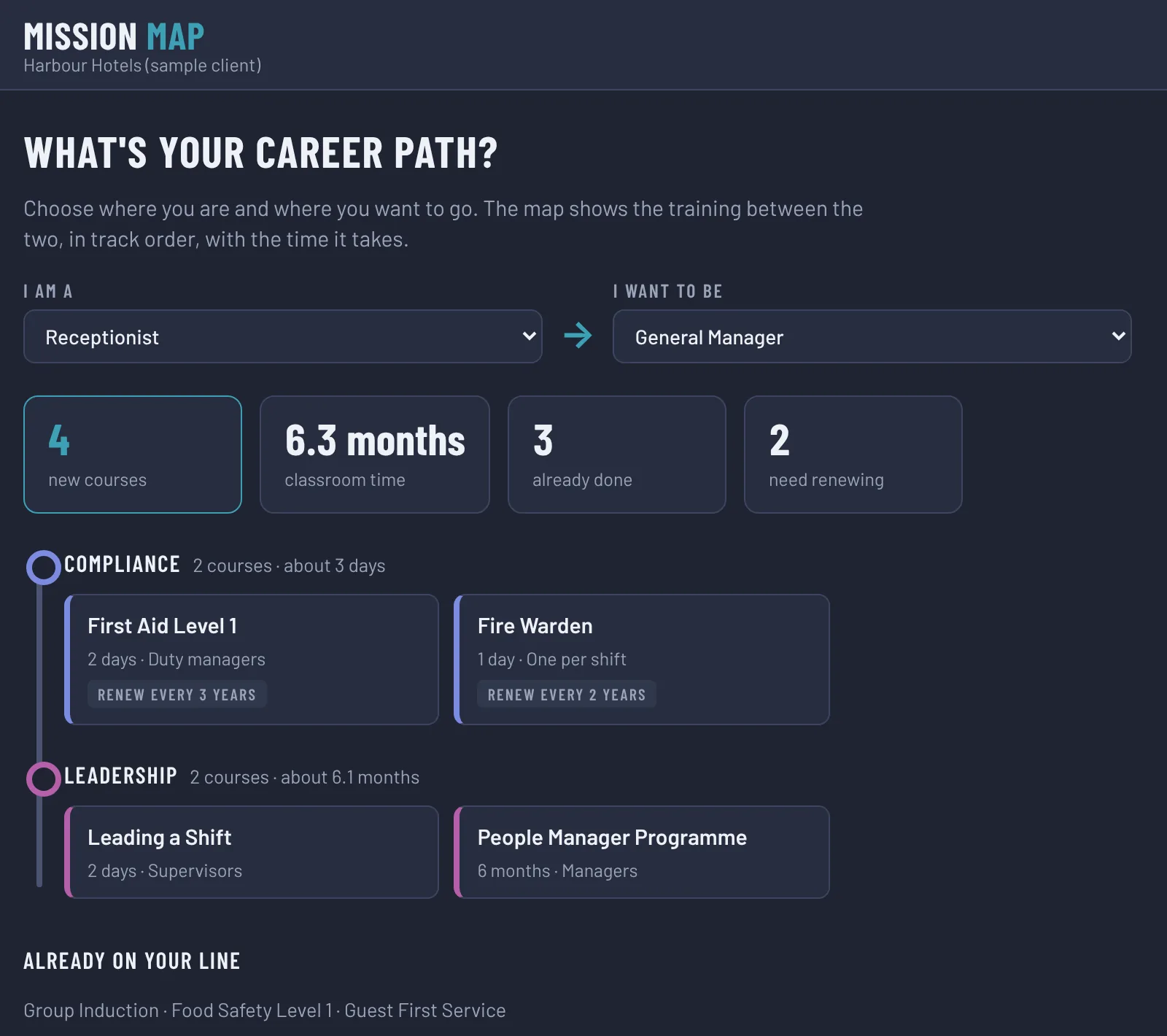
It’s the same idea the catalogue was built on, a job with direction, but now it answers the question for each person who opens it.
Look at what you already have
This is how we approach most of our work. Before anyone designs a screen, we look at what the business already holds: the spreadsheet, the catalogue, the process everyone follows but nobody has written down. Then we ask what sits around it. Who feeds it, who relies on it, and what question do they keep asking that it can’t answer?
The best tools are rarely built from scratch. They’re built from what a business already knows.
A training matrix became a printed map, and the printed map is becoming a tool people can ask questions of. The same path is open to most of the data sitting in your shared drive.
How to build one that gets used
- Start with the roles, not the courses. List the jobs people actually do, then what each one needs. A matrix built from the course catalogue ends up measuring attendance, not ability.
- Group courses into tracks people recognise. Induction, safety, systems, leadership. Tracks turn forty courses into six ideas.
- Decide what counts. Completing a module, passing an assessment and being signed off on the floor are different things. Note which courses expire and when.
- Show the path, not just the grid. The value is in seeing how one role leads to the next. Make that visible, whether on a printed map or on screen.
- Keep it current. Decide who owns it and how changes reach it. A matrix that’s out of date is worse than none, because people trust it.
If your training lives in a learning system, a spreadsheet and someone’s memory, and nobody can answer “what do I need to get to the next job?” without a meeting, book a call. We’ll show you what a map of your own business could look like.
Tracy HagermanFounder, Visual Communications Director, JuneDay · About us
eLearning development at JuneDay